
SUMEE!
Released 6/17/2026First seen 3mo agoLast fetched 10d ago
Latest Snapshot
Apple App StoreUS · 2026-10-06
Score
4.78
Ratings
150
Reviews
-
Version
2.9.7
Lifetime
Rank history · 30d
App Storebest rank per day, all markets
Media




Heuristic score · not affiliated with Apple or Google.
Screenshots from the App Store.
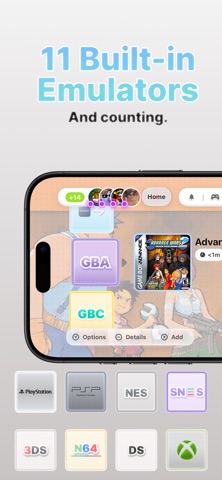
SUMEE! turns your iPhone into a complete portable gaming system for organizing, customizing, emulating, and enjoying compatible retro games all in one place. Designed for both handheld and big-screen play, SUMEE! is especially focused on users who play with a game controller and connect their iPhone to an external display via HDMI or AirPlay. SUMEE! supports compatible files from multiple classic systems, including: • Nintendo GameCube • Nintendo 3DS • Nintendo DS/DSi • Game Boy Advance • NES • SNES • Nintendo 64 • PSP • PlayStation / PSX • Sega Genesis Main Features: • Dock Mode for big-screen gaming with a console-like experience • Game controller support • External display support via HDMI and AirPlay • Modern interface inspired by classic handheld devices • Game launcher and library organization • USB support for importing your own files • iCloud support for compatible data • RetroAchievements support • Save files and save states • Customizable touch controls • Skins, themes, and visual customization options • Performance tools for a smoother experience • Local multiplayer features for compatible systems • Split-screen support for two players in compatible games • Wi-Fi support for compatible DS/DSi local play • GBA Link support for compatible local connectivity features • PictoMee, an integrated social space for sharing posts • User profiles, friends, and social interactions • Direct messages between users • Account options and user safety tools SUMEE! does not include games, ROMs, BIOS files, or copyrighted content. Users are responsible for importing only files they legally own or have the right to use. SUMEE! is not affiliated with, endorsed by, sponsored by, or associated with Nintendo, Sony, PlayStation, Sega, RetroAchievements, Apple, AirPlay, or any other console manufacturer, game publisher, service provider, or trademark owner. PictoMee is intended for users aged 16 and older. Users should review and follow PictoMee's Terms and Community Guidelines before using social features. Built for users who enjoy retro experiences, compatible emulation, customization, achievements, social connectivity, portable gaming, and a console-like big-screen gaming experience.
Categories as listed by the developer on Google Play / the App Store.
vs 0 median in the prior 7 days
Last bump 84d ago.
Signals: version bump ≤ 7 days + review velocity ≥ 1.5× the 7-day median. Both ⇒ Active event; version only ⇒ Recent update; spike only ⇒ High engagement.
Sounds • All SUMEE! sounds have been updated. ChatGlobal / PictoMee • You can now react to messages. • Images can now be tapped to view them in full screen. • Improved the chat interface when multiple consecutive messages are sent by the same person. • Overall UI responsiveness and fluidity have been improved. PictoFriends • Added GIF support. • Substantially improved call stability and behavior. Improvements • Improved performance on the Home screen. • Redesigned application icons to better capture the Nintendo 3DS aesthetic. • Redesigned the Grid Theme (the default theme). • Liquid Glass frames now properly adapt to the selected theme, whether it uses Liquid Glass or Blur. • Redesigned the widget selection interface. • Redesigned the theme selection interface. Bug Fixes • PSP and N64 now report their presence on Discord. • Fixed a bug that prevented apps inside folders from being opened. • Fixed a bug that prevented PictoTee friend requests from appearing. • Fixed a bug where answering a SUMEE! call would incorrectly redirect users to Groups. Calls now remain active for both participants as expected.
Fresh new look for SUMEE! and lots of improvements. • Complete redesign of all SUMEE! apps. • New SUMEE! app icon. • New music for the Default theme. • Friends have been added to the Home menu. Press and hold a PictoFriends friend to add them to your Home app list. PictoFriends • You can now reply to Discord messages. • Fixed a bug that prevented notifications from groups created in SUMEE!. PSP • New option to turn the Circle, Cross, Triangle, and Square buttons into a virtual joystick, making it easier to control the camera in supported games. This option is available under Gamepad in the PSP emulator. Emulation • New Auto Save feature. The emulator automatically creates a save state every 30 seconds. You can access your auto saves from the folder icon in the bottom menu of the emulators.
What's New Discord Update We've integrated a deeper Discord connection, bringing powerful new social features: * Direct messaging with Discord users. * Enhanced direct messaging for Discord users who have SUMEE! installed, providing a better and more seamless experience. * Group Chats. * One-on-one and Group Voice Calls. * In Pictomee, the Global Chat is now connected with Discord. Messages are synchronized between the Pictomee Global Chat and the official SUMEE! Discord server's General Chat, allowing both communities to interact in real time.
What's New • Added skin support for Nintendo 64. • Improved compatibility for existing SNES, NES, Sega Genesis, and Nintendo DS skins, allowing more skins to work correctly. • The floating Home button now automatically hides when a skin is active. To open the main menu, simply use the Home button built into the skin. • Completely redesigned the SUMEE XMB theme in the Themes app. • Added a PS3-inspired background that's much closer to the original (Internet connection required). • Replaced some music tracks with officially usable alternatives. See Settings > Credits for details.
Changes: • Added a new 3D interface when launching an app. You can tap and move it freely. • Added a new "3DS Style" layout option for ROMs. You can find it under Settings > Visuals. • Expanded the 3D ROM effect to more areas throughout the app. • Fixed an issue that caused reduced performance in the GBA emulator when using fullscreen mode. • Fixed lag in the PSP emulator when using fullscreen mode. • Added a new Background Grid option for Game Systems. Open View Options to turn the grid on or off. • Updated the Online section to include PSP support.
3DS App Update This update includes small improvements to the user interface and several areas of the app to make it easier to understand and use. Changes: • Fixed issues with the positioning of the virtual controls on 3DS. • Improved the Balanced mode on 3DS, providing a slight performance boost. • Slightly updated the design of the PSP emulator interface. • A virtual cursor has been added for the 3DS, allowing you to use the touchscreen with a game controller.
PSP support has been fully fixed. • Added Local Multiplayer support for PSP. You can find it in Settings > Online. • Improved the Nintendo 3DS Settings. • Improved the Nintendo DS/DSi Settings. • A small bug on GBA Skins is now fixed. These settings are available in Settings.
What's New • Added Vulkan support for PSP (expect a significant performance boost). • Added new advanced PSP settings in the Settings app.
What's New • Improved performance in PictoMee Global Chat. • Improved Friends and Direct Messages. • Added a new "Retro Mode" setting in Settings. • Added a new PSP section in Settings to adjust the frame skipping option. • Added several new icons throughout the Settings menu. • Polished the Game Systems interface, especially the "By Consoles" section. • Redesigned the Skins and Save Games UI.
What's New • Redesigned app header for a cleaner look. • You can now drag an app and drop it onto the next page. • Refreshed the Friends section with a new design. • Direct messages are now faster and smoother. • Improvements to the Skins section. • Added a new Simple View for Game Systems. Enable Simple Mode to load the grid instantly without the initial animation.
• Fixed and slightly updated the Controller Settings UI. • Slightly simplified the Settings menu and added a shortcut to Controller Settings from Settings.
Versions observed by AppWolf's store pollers · newest first · up to 50 shown. History begins when an app enters our catalog - earlier versions aren't retroactively visible.
No text reviews captured for this app yet.
Apps sharing the most store-listed category tags with this one.

Fun with Ragdolls

Excavator Simulator REMAKE

Sky Aces 2

Weaphones: Firearms Simulator Volume 1

Modern Warships: Naval Battles

주디: 내가 찍은 도트로 아바타 꾸미기
Want a side-by-side? Compare with Fun with Ragdolls